
The AI security crisis is also an API-key crisis.
What Railway, LiteLLM and OpenCode Console disclosures mean for your credentials, production access and AI spend. Includes a key-ownership worksheet.
Oct 22, 2026 · 10 min read
Field Notes from Thunkle, a studio that takes AI-built apps from prototype to secure, production-ready software.
By Thunkle · Incident sources checked 22 October 2026
An AI service key can be a spending account. A deployment token can be access to your next release. A database credential can be access to your customers. Treating all three as strings in an environment file misses what is actually at risk.
Recent disclosures from Railway, LiteLLM and OpenCode Console bring that problem into focus. These are separate incidents, with different reported exposure and unresolved questions. Their practical connection is the authority a credential carries after it leaves the place you intended to keep it.
For a founder, the useful question is not simply whether a platform encrypts its secrets. It is: if this tool, account or running service were compromised, what else could someone reach?
That is a question for code and configuration review, not a green dashboard badge. Thunkle's developer-led security audits connect exposed access to the actual application rules, privileged operations and customer impact.
Three disclosures, not one attack story
| Disclosure | What the vendor reported | The distinction that matters |
|---|---|---|
| Railway, 21 October | An unauthorized party may have accessed encrypted customer environment variables and obtained decrypted contents for some. | Potential exposure included more than AI keys. Railway recommended precautionary rotation for all users while investigating a subset. |
| LiteLLM, 21 October | Compromised release infrastructure published malicious 1.107.0 Python wheels and container images. | The official GitHub source tag did not contain the malicious files. Reviewing that tag alone would not establish that a downloaded artifact was clean. |
| OpenCode Console, 17 October | The company reported an incident affecting 1.4% of Console users, a subset with external providers linked. | A subsequent clarification distinguished the hosted Console from OpenCode itself. Do not turn this into a claim that every local OpenCode installation leaked its keys. |
Sources: Railway disclosure, LiteLLM incident report, OpenCode notice and Console clarification.
LiteLLM said its private enterprise distribution was not affected. Establish exposure against its listed public 1.107.0 artifacts and affected moving container tags, including Docker Hub's latest, main-latest and main-stable during the incident window. Check the pulled image digest and timing; a current tag or an enterprise customer label alone does not settle what ran.
OpenCode described its incident as related to a distillation attack. That description does not, by itself, establish how initial access occurred. Nor do these disclosures establish that all three incidents share an attacker or root cause.
The lesson does not need that speculation. Credentials held by one system can authorize work in another.
Encryption at rest does not end the review
A service that uses a credential needs some authorized way to use it. Encryption of stored values is important, but the security boundary also includes the application, its identities, its decryption permissions and the systems that receive the decrypted value.
The same applies to a small app built with AI. A secret may be absent from the repository and still appear in an API response, debug log, generated file or support export. A server-only variable can be mishandled by code that serializes it into something public.
Our frontend environment-variable lab shows several of those paths with synthetic values. Searching source for a key is one check. Reviewing what the deployed application actually sends is another.
Also distinguish secrets from identifiers meant for public clients. Not every visible key is a finding. Our Supabase key guide explains why a public client key and a privileged server credential require different treatment.
Map where the credential can go
This conceptual map is a worksheet for your own system, not a reconstruction of the incidents above. Each arrow represents a possible exposure path. The credential's permissions determine which consequences are possible.
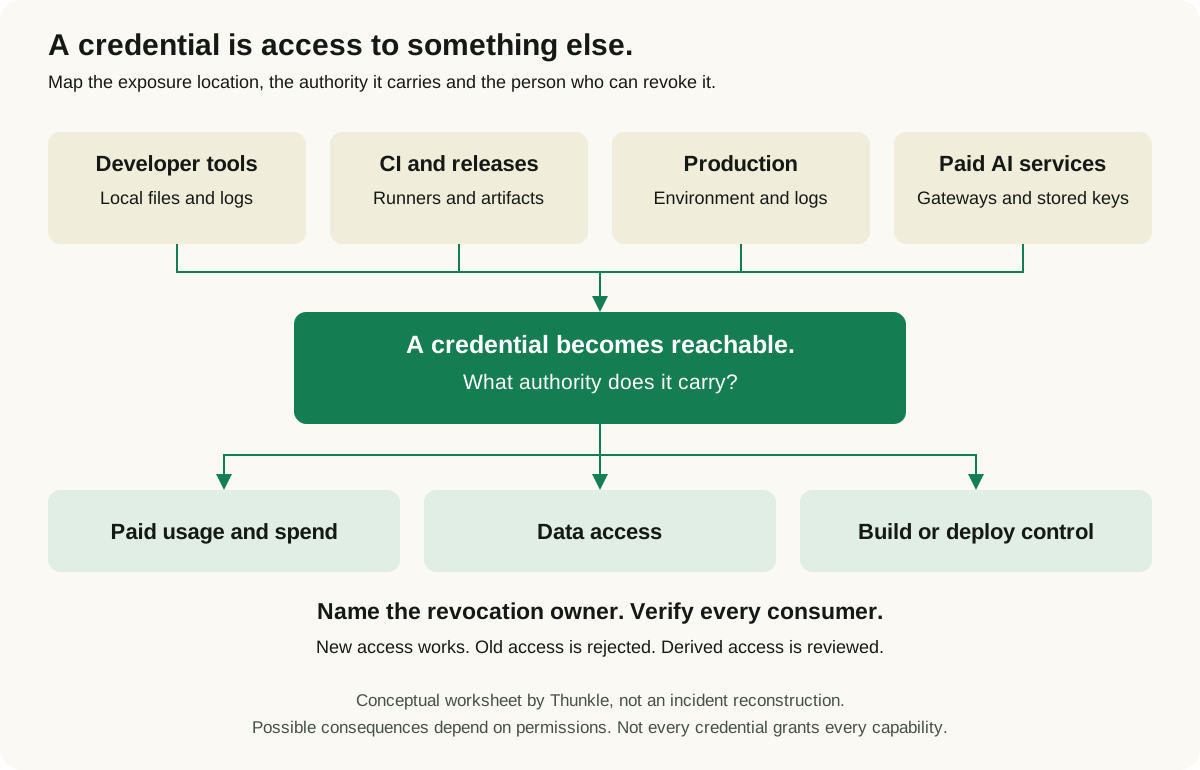
Download the credential-exposure diagram for your own ownership review.
For each arrow, ask what code, person or identity can make the transfer happen. Can a development tool read production variables? Can a build job publish a release and retrieve customer data? Does a gateway retain credentials for several providers? Where would those values appear if verbose logging were enabled?
The objective is to find unnecessary connections, then remove or narrow them. Putting a value in a secret manager is not a substitute for checking which identities can retrieve it.
The credential-ownership worksheet
Use key IDs or secret-manager references, never actual secret values. Create one row per credential and environment. The examples below describe what to record, not permissions your system should automatically grant.
| Context | Identify the credential | Record its permitted work | Assign a revocation owner | Evidence to keep |
|---|---|---|---|---|
| Developer tools | Local token, CLI session or integration reference | Which repositories, environments and operations it can reach | Person who can revoke it without the affected laptop | Retrieval locations, expiry and last access review |
| CI and releases | Job identity or release-token reference | Build, artifact upload, signing and deployment permissions separately | Release owner and backup contact | Workflow permissions, artifact identity and revocation procedure |
| Production | Service identity, database credential or API-key reference | Required data, actions and environment only | Service owner | Running consumers, replacement release and permission tests |
| Paid AI services | Provider/project key or gateway credential reference | Models, projects, usage and administrative operations allowed | Account owner who can stop usage | Usage alerts, limits where supported and revocation confirmation |
Add these fields to every row:
- All known consumers, including workers, scheduled jobs, preview deployments and external automation.
- Where copies may exist: configuration, logs, build outputs, local machines and exports.
- How to replace or revoke the credential from a trusted system.
- How to test that the new credential works and the old one is no longer accepted.
- Which sessions, derived tokens or access changes require separate investigation.
If nobody can complete a row, that is a concrete review task. “The developer handles it” is not a revocation procedure when that developer's account is the affected one.
Rotation has to reach the running service
Railway's AWS follow-up explicitly calls out consumers outside Railway, including local development and CI. It also connects configuration changes to redeploying the service that uses them.
That is an easy gap to miss. Saving a replacement value does not prove an existing worker loaded it. Updating the web app does not prove a nightly task stopped using the old key.
A practical response needs a named owner for each of these steps:
- Establish scope and contain access. Identify the exposed credential and the systems it could reach. Preserve relevant evidence while taking urgent containment action. Use the provider's current incident guidance.
- Use a trusted control plane. Do not enter replacement secrets into a host you suspect is still compromised. Isolate or rebuild affected execution environments as appropriate to the incident.
- Revoke and replace deliberately. Prioritize stopping unauthorized use. A known compromised credential should not become your convenient rollback option.
- Update every consumer. Include background workers, deployment automation and integrations outside the main hosting account. Deploy or restart them where required.
- Test both sides. Confirm an intended operation succeeds with the replacement and that the old credential is rejected, using a safe provider-supported check. Do not copy credentials into a ticket as proof.
- Review what happened while access existed. Correlate provider activity, application logs and billing. Look for unauthorized credentials, grants or resources, not just the original key.
Revoking a long-lived credential and invalidating every session or derived token are not necessarily the same operation. Check the provider's behavior rather than assuming one button cancels everything.
A compromised package changes the response
LiteLLM's report describes credential theft and remote execution capability in affected artifacts. Its guidance treats environments that executed them as compromised. In that situation, replacing one provider key while leaving the execution environment intact is not a sufficient recovery plan. Follow the vendor's current containment and recovery instructions from clean tooling.
There is also a release lesson here. The file you reviewed, the package your build downloaded and the image production executed are separate pieces of evidence. A trusted-looking version label cannot establish that they match.
For your own application, record the approved source revision, build origin and deployed artifact identity. Review who can change the workflow that produces them. A signature is useful evidence, but it does not rescue a release process an attacker is authorized to operate.
What to have a developer review
You do not need to wait for a breach notice to find these gaps. Start with the credentials that can read customer data, change production or spend money, then trace their consumers and permissions.
For an AI-built application, the review should also examine whether ordinary users can trigger privileged backend work. A perfectly hidden server key can still be misused through an endpoint that fails to check the caller's permission.
Thunkle's security audit service provides a scoped developer review, prioritized findings with evidence and remediation guidance. We agree the repositories, environments and workflows being reviewed rather than claiming a scan covers everything. A free re-review of agreed fixes is included; implementation and deployment work are quoted separately.
Get a security audit quote. Tell us what your app does, where it runs and which integrations hold privileged access. Share access through an agreed process, not secrets in the enquiry form.
Know what needs fixing before you ship.
Get a scoped developer review, evidence-backed findings and remediation guidance, with a free re-review of agreed fixes. Fix implementation is quoted separately.